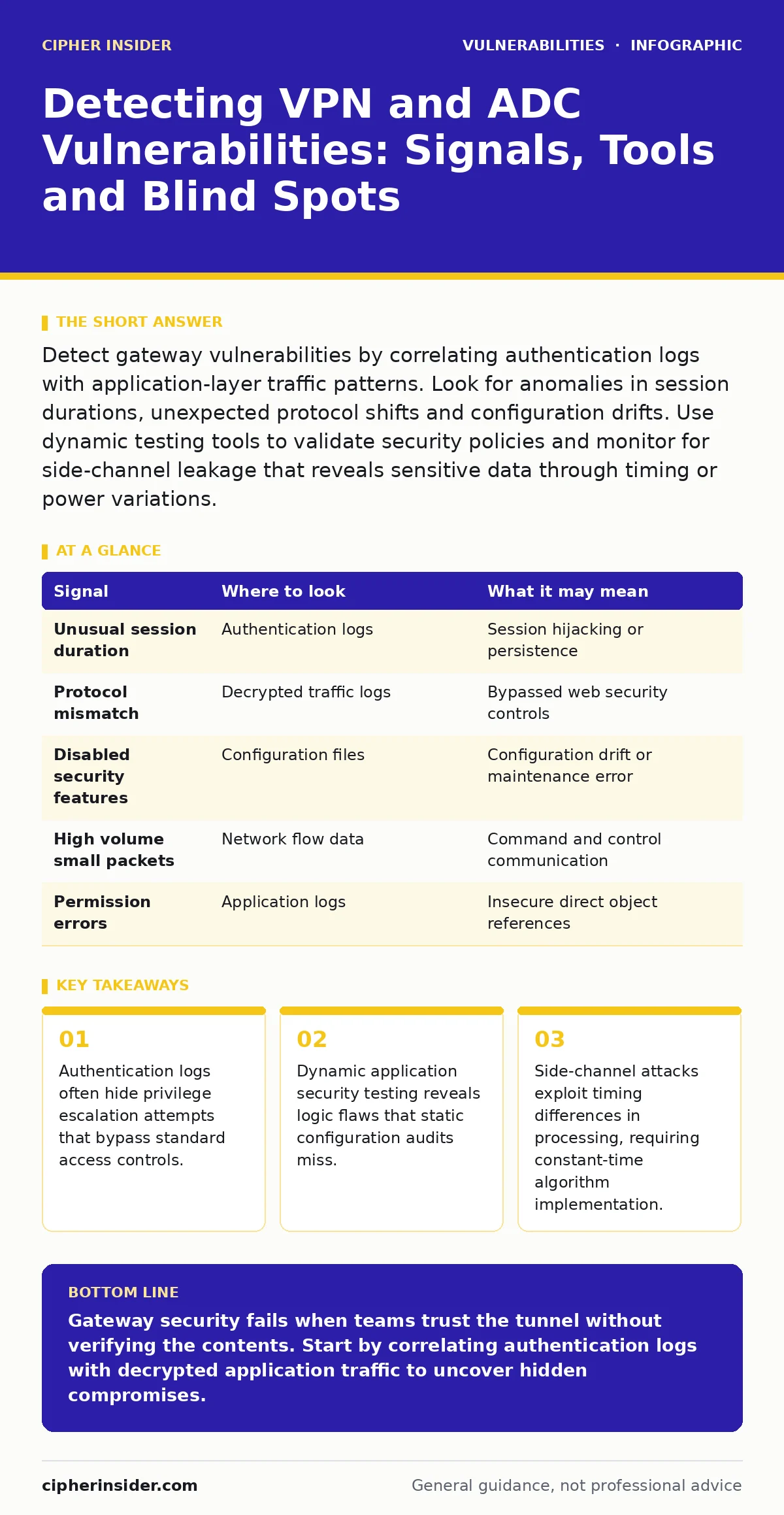
Detect gateway vulnerabilities by correlating authentication logs with application-layer traffic patterns. Look for anomalies in session durations, unexpected protocol shifts and configuration drifts. Use dynamic testing tools to validate security policies and monitor for side-channel leakage that reveals sensitive data through timing or power variations.
Authentication Log Anomalies Reveal Privilege Escalation
Authentication logs record every attempt to establish a secure tunnel. You must look beyond failed login attempts. Successful logins from unusual geographic locations or at irregular hours indicate compromised credentials. More subtle signs appear in session duration metrics. A user who normally stays connected for 2 hours but remains active for 24 hours may indicate a hijacked session. This behaviour suggests an attacker is maintaining persistence without triggering immediate alarms.
Check for rapid successive authentications from a single source IP address. This pattern often precedes brute force attacks or credential stuffing campaigns. Modern gateways rate-limit these attempts, but distributed attacks spread requests across multiple IPs. You must correlate these events with downstream application logs. If authentication succeeds but subsequent application requests fail, the gateway may be misconfigured to accept tokens it cannot validate. This mismatch creates a window for insecure direct object references (IDOR), where an attacker accesses resources by manipulating object identifiers in the URL path.
Application Layer Traffic Patterns
Tunneling protocols encapsulate application data within a secure wrapper. This encapsulation hides the contents from standard network monitors. You must inspect traffic at the gateway before it is encrypted or after it is decrypted. Look for protocol mismatches. If a user connects via a web browser but the gateway sees database query traffic, something is wrong. This discrepancy often indicates that an attacker has bypassed web security controls and is communicating directly with backend services.
Monitor for unusual payload sizes. Standard web requests have predictable length ranges. Sudden spikes in data volume may indicate data exfiltration. Similarly, tiny, frequent requests may signal command and control communication. You must compare current traffic baselines against historical norms. Deviations from the expected pattern highlight potential compromises. This analysis requires deep packet inspection capabilities. Without visibility into the decrypted payload, you cannot distinguish between legitimate large file transfers and malicious data theft. This blind spot makes command injection attacks difficult to detect if they occur within encrypted streams.
Configuration Drift and Security Misconfigurations
Gateways and application delivery controllers manage complex routing rules. These rules change frequently during maintenance or updates. Configuration drift occurs when the live system diverges from the approved security baseline. You must regularly compare the current configuration against the golden image. Look for disabled security features. Administrators sometimes disable intrusion prevention systems to resolve connectivity issues and forget to re-enable them. This temporary change becomes a permanent vulnerability.
Check for overly permissive access control lists. Rules that allow traffic from any source IP address to internal services create a wide attack surface. You must verify that each rule has a specific business justification. Remove any rule that lacks documentation. This audit process reveals security misconfigurations that expose internal networks to external threats. Automated tools can scan configurations for known bad patterns, but human review remains necessary to understand the context. A rule that looks dangerous may be required for a specific legacy application. You must balance security with operational continuity.
| Signal | Where to look | What it may mean |
|---|---|---|
| Unusual session duration | Authentication logs | Session hijacking or persistence |
| Protocol mismatch | Decrypted traffic logs | Bypassed web security controls |
| Disabled security features | Configuration files | Configuration drift or maintenance error |
| High volume small packets | Network flow data | Command and control communication |
| Permission errors | Application logs | Insecure direct object references |
Dynamic Testing Validates Security Policies
Static configuration audits only show what is set, not how it behaves. You need to test the gateway under load and with malicious inputs. Dynamic application security testing (DAST) tools simulate attacks against the live system. These tools send crafted requests to identify vulnerabilities such as buffer overflows or cross-site scripting. You must run these tests in a staging environment first. Testing against production systems can disrupt services or trigger false alarms.
Focus on the interaction between the gateway and backend applications. The gateway may correctly reject a malicious request, but the backend application might process it differently. This discrepancy reveals a gap in the security chain. You must verify that the gateway enforces all security policies consistently. Inconsistent enforcement allows attackers to find paths of least resistance. Regular testing ensures that new updates do not introduce regressions. This continuous validation process helps maintain a strong security posture. It also identifies CWE weakness categories that are specific to your technology stack.
Side-Channel Leakage in Processing
Side-channel attacks exploit information gained from the physical implementation of a system, rather than logical flaws in the algorithm itself. Timing attacks measure how long it takes to process a request. If the gateway takes longer to reject an invalid password than a valid one, an attacker can deduce correct characters one by one. You must implement constant-time algorithms for all cryptographic operations. This ensures that processing time does not depend on secret data.
Power analysis attacks monitor the electrical consumption of the device. Variations in power usage can reveal cryptographic keys. This is more relevant for hardware-based tokens, but server-side processing can also leak information. You must isolate critical processing units from general network traffic. This isolation reduces the risk of attackers correlating external events with internal processing states.
Regular firmware updates often patch known side-channel vulnerabilities. You must verify that updates address these specific issues. Ignoring side-channel attacks leaves your infrastructure vulnerable to sophisticated adversaries who have physical access or high-resolution monitoring capabilities.
See also: Host Header Injection: Risks and Protection for Small Businesses · Remediation Tracking Mistakes That Leave Systems Exposed
Common Blind Spots in Detection
Many security teams focus exclusively on the perimeter. They assume that once traffic passes through the gateway, it is safe. This assumption fails when the gateway itself is compromised. You must monitor the gateway’s internal processes. Look for unexpected process spawns or memory usage spikes. These indicators suggest that an attacker has gained control of the gateway operating system. This internal compromise allows the attacker to intercept all traffic passing through the device.
Another blind spot is the management interface. Administrators often secure the user-facing side but neglect the administrative console. Attackers target these interfaces to gain full control of the device. You must enforce strict access controls on management ports. Use out-of-band management networks to isolate administrative traffic. This separation prevents attackers from reaching the management interface through the production network. Regularly review access logs for the management interface. Unusual access patterns indicate potential compromise. This oversight is a common cause of IoT device vulnerabilities when gateways manage connected devices.
Integrating Detection into Daily Operations
Detecting vulnerabilities requires a holistic approach. You must combine log analysis, traffic monitoring and dynamic testing. Integrate these data sources into a central security information and event management system. This consolidation allows you to correlate events across different layers. For example, a failed login attempt followed by unusual traffic patterns may indicate a successful breach. Automated alerts help you respond quickly to potential threats.
Regularly update your detection rules. Threat actors constantly evolve their techniques. Static rules become ineffective over time. You must adapt your monitoring strategies to reflect new attack methods. Engage with the security community to stay informed about emerging threats. Share anonymised data with peers to improve collective defence. This collaborative approach strengthens your overall security posture. It also helps you identify NoSQL injection attempts that target modern database backends connected through your gateway. Continuous improvement is key to staying ahead of adversaries.
Key takeaways
- Authentication logs often hide privilege escalation attempts that bypass standard access controls.
- Dynamic application security testing reveals logic flaws that static configuration audits miss.
- Side-channel attacks exploit timing differences in processing, requiring constant-time algorithm implementation.
Gateway security fails when teams trust the tunnel without verifying the contents. Start by correlating authentication logs with decrypted application traffic to uncover hidden compromises.
Frequently asked questions
How do I distinguish between a legitimate large download and data exfiltration?
Compare the file type and user role against historical baselines. Legitimate users download expected file types during work hours. Exfiltration often involves unusual formats or occurs outside normal patterns.
Can dynamic testing damage my production environment?
Yes, aggressive testing can disrupt services or crash applications. Always perform dynamic testing in a staging environment that mirrors production. Use throttled requests to minimise impact if testing live systems is unavoidable.
What is the biggest risk of configuration drift?
Configuration drift often disables critical security controls without documentation. This creates unmanaged vulnerabilities that attackers can exploit. Regular audits against a golden image prevent this silent degradation of security.
How do I protect the management interface?
Isolate the management interface on a separate network segment. Enforce multi-factor authentication and strict IP whitelisting. Monitor access logs for any unauthorised connection attempts or unusual administrative actions.
How this guide was produced: written by the Cipher Insider editorial team with AI assistance, checked against the public references listed below, and reviewed when the facts change. See our editorial policy or report an error.