App permission management requires auditing software privileges regularly, restricting background access, and denying broad system capabilities to programs that do not strictly require them to function. This discipline limits silent data collection and reduces the blast radius if an account is compromised.
1. Restrict location tracking to active use
Location tracking permissions grant software continuous access to physical coordinates, which creates persistent behavioral profiles over time. Software developers often demand this capability for features you rarely use, turning your daily movements into a tradable commodity. Limiting geographic tracking to moments when you actively engage with the interface prevents silent background harvesting.
The reasoning rests on reducing passive telemetry collection that happens entirely outside your awareness. When software runs location routines in the background, intermediaries aggregate your physical habits for surveillance advertising.
- Open your operating system settings menu and navigate to the application permissions list.
- Locate the location entry and review every program currently granted persistent geographic access.
- Change each non-essential setting from permanent allowance to active use only.
2. Audit microphone and camera privileges
Microphone and camera privileges expose raw sensory feeds directly to software running on your hardware. Malicious or poorly written routines can capture audio or video streams when you least expect it, violating personal boundaries. Restricting these sensory inputs ensures that recording hardware activates exclusively on your explicit command.
The underlying mechanism relies on the principle of least privilege, which dictates that software should only possess the exact capabilities needed for its immediate task. Denying persistent sensory access stops unauthorized recording loops even if a program suffers a remote code execution flaw.
- Navigate to the privacy panel within your device configuration settings.
- Inspect the individual toggles assigned to audio and visual hardware components.
- Revoke access immediately for any utility that does not revolve around direct communication.
3. Limit contacts and storage access
Contacts and storage access grants software permission to read your entire social graph and private local files. Programs routinely request this broad authority merely to simplify sharing features or importing media. Denying these broad sweeps forces software to ask for specific files on a case-by-case basis instead of copying your entire archive.
This restriction mitigates the fallout of remote database thefts where third-party servers lose your personal information. When you prevent mass ingestion of your address book, you also protect the privacy of friends and colleagues who never consented to sharing their details.
- Open file and contact permission panels in your system settings menu.
- Switch contacts access from total synchronization to manual selection modes.
- Restrict file storage permissions to isolated folders rather than the entire disk.
4. Revoke background refresh for dormant tools
Background refresh permissions allow installed programs to execute code and transmit telemetry while your screen is locked. This constant background chatter drains battery life and feeds data brokers without providing any tangible benefit to your daily workflow. Disabling this capability stops software from phoning home when you are not actively looking at the interface.
The hidden cost of background execution is increased attack surface area and continuous network activity that leaks metadata. Stopping background loops forces software into a dormant state until you explicitly wake it up.
- Review the background app refresh panel in your device configuration menu.
- Identify utilities you open less than once a week and toggle their background execution off.
5. Restrict device pairing and local network discovery
Device pairing and local network discovery permissions let software scan your home router, smart appliances, and nearby Bluetooth gadgets. Software vendors use this capability to map your physical environment and link your device to other hardware in the vicinity. Blocking local network sweeps prevents software from cataloging your private infrastructure.
This measure helps mitigate smart home privacy risks by stopping rogue applications from fingerprinting every connected appliance on your local area network. Restricting local discovery breaks invisible tracking chains that bridge your mobile device with stationary smart gadgets.
- Locate the local network or nearby devices permission list in your system settings.
- Revoke network scanning rights from games, calculators, and single-purpose utilities.
- Grant local discovery access only to casting devices and official hardware controllers.
See also: Location Tracking: How It Works and How to Control It · Fileless Malware Mistakes: 7 Errors That Bypass Traditional Defenses
6. Monitor clipboard reading behaviors
Clipboard reading permissions give software instant access to text, passwords, and links you recently copied to your device memory. Many programs inspect your clipboard automatically every time you switch back to their interface, harvesting sensitive data without your consent. Restricting automatic clipboard reads stops software from snooping on sensitive information copied from other applications.
The technical trade-off is losing the convenience of auto-pasting verification codes or web links into input fields. Disabling this capability forces you to paste items manually, restoring your control over what data leaves your clipboard.
- Check if your operating system features a notification banner for clipboard access events.
- Observe which utilities trigger clipboard warnings during normal daily navigation.
- Uninstall programs that persistently read your clipboard without a valid functional reason.
7. Purge unused utilities and orphaned accounts
Unused utilities sitting dormant on your device continue to hold historical permissions and cached data tokens. Software you installed years ago can still maintain valid authorization to your cloud accounts and local sensors long after you forgot it existed. Deleting abandoned programs and revoking their associated tokens closes off forgotten entry points.
The core principle here is reducing your digital footprint to the absolute minimum required for current tasks. Regular spring cleaning of your device inventory prevents forgotten software from quietly leaking data in the background.
- Sort your installed application list by last usage date or file size.
- Delete every program you have not opened within the last 3 months.
- Visit your primary cloud account settings to revoke third-party API tokens granted to deleted software.
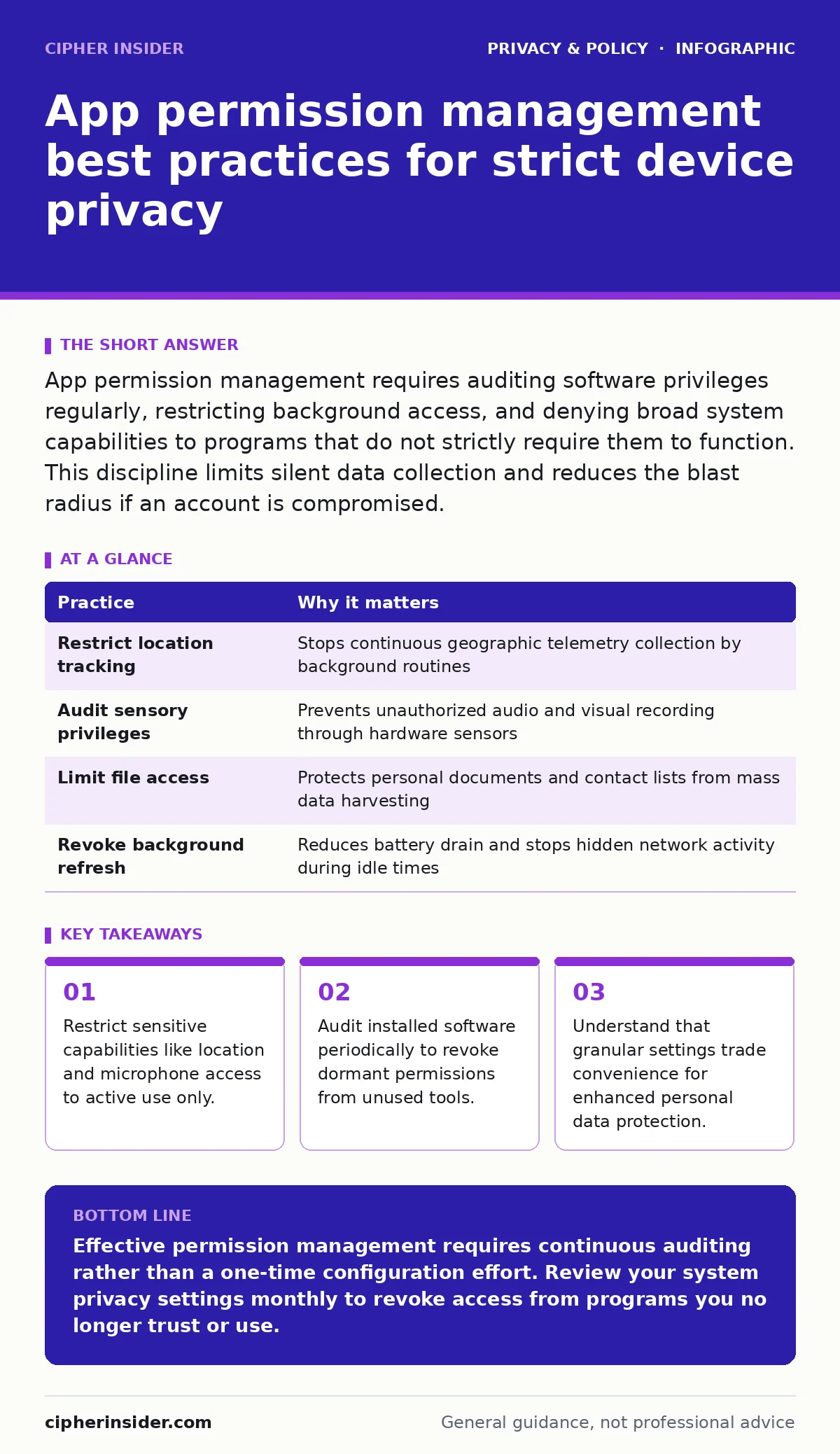
| Practice | Why it matters |
|---|---|
| Restrict location tracking | Stops continuous geographic telemetry collection by background routines |
| Audit sensory privileges | Prevents unauthorized audio and visual recording through hardware sensors |
| Limit file access | Protects personal documents and contact lists from mass data harvesting |
| Revoke background refresh | Reduces battery drain and stops hidden network activity during idle times |
Key takeaways
- Restrict sensitive capabilities like location and microphone access to active use only.
- Audit installed software periodically to revoke dormant permissions from unused tools.
- Understand that granular settings trade convenience for enhanced personal data protection.
Effective permission management requires continuous auditing rather than a one-time configuration effort. Review your system privacy settings monthly to revoke access from programs you no longer trust or use.
Frequently asked questions
Do app permissions protect me from zero-day exploits?
Permission controls limit the damage an exploit can cause by denying unauthorized access to sensitive sensors, but they do not stop vulnerabilities from being triggered.
Why do harmless games request access to my microphone?
Software vendors bundle broad permissions into simple games to harvest telemetry data for advertising networks.
Can I automate permission revocation for unused apps?
Modern operating systems include native features that automatically remove permissions from dormant software after several months of inactivity.
Does revoking storage access break photo sharing?
Restricting storage access forces software to request specific photos through a system picker window rather than scanning your entire image gallery.
How this guide was produced: written by the Cipher Insider editorial team with AI assistance, checked against the public references listed below, and reviewed when the facts change. See our editorial policy or report an error.