Most encrypted email failures stem from poor key management, unencrypted metadata, and weak password hygiene. You must protect private keys, verify recipient identities, and ensure end-to-end encryption rather than relying on transport-level security alone.
Mistake 1: Trusting Transport Encryption as End-to-End Protection
Many users assume that seeing a padlock icon in their web browser means their email is secure from prying eyes. This icon only indicates that the connection between your device and the email provider’s server is encrypted using TLS (Transport Layer Security). TLS protects data while it travels over the network, but the email provider can read, store, and scan the content before it reaches the recipient.
Why it hurts:
The email provider holds the decryption keys for your inbox. If an adversary compromises the provider’s servers, obtains a legal order, or if an insider leaks the data, your entire email history is exposed in plain text. You are trusting the infrastructure operator with the confidentiality of your messages, which defeats the purpose of privacy-focused communication.
The fix:
Use end-to-end encryption (E2EE) protocols such as PGP (Pretty Good Privacy) or S/MIME (Secure/Multipurpose Internet Mail Extensions). In E2EE, only the sender and the recipient possess the keys required to decrypt the message. The email provider merely transports the encrypted blob without the ability to read it. Verify that your email client supports these standards natively or through a trusted extension.
Mistake 2: Ignoring Visible Metadata
Encrypting the body of an email does not hide the envelope information. The subject line, sender address, recipient addresses, and timestamps remain visible to anyone inspecting the traffic or the mail server logs. This is known as metadata, and it is often more revealing than the message content itself.
Why it hurts:
Adversaries can perform traffic analysis to reconstruct your social graph, business relationships, and daily routine. Even if the content is unreadable, the pattern of communication can confirm suspicions or target specific individuals for further exploitation. For example, frequent encrypted emails to a specific domain at unusual hours can signal insider trading or sensitive negotiations.
The fix:
Minimize metadata leakage by using generic subject lines and avoiding sensitive identifiers in the "To" or "Cc" fields. For high-sensitivity communications, consider using anonymous remailers or mixing services that strip identifying headers. Be aware that some encryption methods, such as OpenPGP, can encrypt the subject line if configured correctly, but this is not the default behaviour in most clients.
Mistake 3: Storing Private Keys Without Backup
Your private key is the mathematical secret that allows you to decrypt messages sent to you. If you lose this key, you lose access to your past communications forever. Many users generate a key pair and store it only on their primary device, assuming the cloud or the email provider will safeguard it.
Why it hurts:
Hardware failure, device theft, or accidental deletion results in permanent data loss. Unlike a password, a private key cannot be reset or recovered by a support team. You become locked out of your own encrypted history, rendering years of secure communication useless. This is a silent failure mode that only becomes apparent when you attempt to access an old message.
The fix:
Create encrypted backups of your private key and store them in multiple physical locations. Use a strong passphrase to protect the backup file itself. Consider using a hardware security module or a dedicated USB drive for long-term storage. Test your recovery process periodically to ensure the backup is intact and readable.
Mistake 4: Failing to Verify Recipient Fingerprints
Encryption provides confidentiality, but it does not guarantee authenticity. If you send an encrypted message to a public key that does not belong to the intended recipient, you are encrypting your secrets for someone else. This often happens when users accept the first key they find in a directory without verification.
Why it hurts:
An adversary can perform a man-in-the-middle attack by publishing their own public key under your contact’s name. You believe you are communicating securely with your colleague, but you are actually sending encrypted messages to the attacker, who can decrypt and read them before forwarding a fake response. This undermines trust in the entire encryption chain.
The fix:
Verify the recipient’s key fingerprint through an out-of-band channel. Compare the long string of alphanumeric characters displayed in your email client with the one provided by the recipient via a phone call, in person, or through a trusted social media profile. Never rely solely on the email interface for key verification.
Mistake 5: Using Weak Passphrases for Key Protection
Your private key is often protected by a passphrase that you enter when decrypting messages or signing emails. If this passphrase is weak, an adversary who steals your private key file can brute-force the encryption and access your communications.
Why it hurts:
A short or common passphrase offers little resistance against modern computing power. Attackers can try billions of combinations per second using specialised hardware. Once the passphrase is cracked, the private key is exposed, and all past and future messages encrypted with that key are compromised. The strength of your encryption is limited by the weakest link, which is often the human-chosen password.
The fix:
Use a long, random passphrase consisting of multiple words or a mix of characters. Aim for at least twenty characters to increase entropy. Avoid dictionary words, personal information, or common patterns. Consider using a password manager to generate and store the passphrase, ensuring it is unique to your encryption key.
See also: App permission management best practices for strict device privacy · Tor Browser Explained: Routing, Relays, and Real Anonymity
Mistake 6: Neglecting Mobile Device Security
Mobile devices are increasingly used for email, but they often lack the same security controls as desktop computers. Users may install email apps that do not support E2EE or fail to secure the device itself with a strong lock screen.
Why it hurts:
If your mobile device is lost or stolen, an attacker can access your email app directly. If the app stores decrypted messages locally or caches private keys in insecure memory, the encryption is bypassed. Furthermore, mobile operating systems may grant excessive permissions to email apps, allowing them to access contacts, location, or other data that can be correlated with your communications. See our guide on mobile app permission abuse for details on limiting data exposure.
The fix:
Use email clients that support on-device encryption and do not store decrypted messages in plain text on the device. Enable full-disk encryption on your smartphone and use a strong PIN or biometric lock. Regularly review app permissions and revoke access for email clients that do not need location or microphone access. Refer to our guide on smartphone privacy settings for comprehensive configuration advice.
Mistake 7: Assuming Encryption Hides All Activity
Encryption protects the content of your messages, but it does not hide the fact that you are communicating. Network observers can still see the volume, timing, and frequency of your emails. This is known as timing analysis, and it can reveal sensitive information even when the content is secure.
Why it hurts:
An adversary can correlate encrypted traffic with other data sources, such as public Wi-Fi logs or cellular tower pings, to identify your location and activities. For instance, sending a large encrypted attachment at a specific time can indicate the transfer of sensitive files. This is particularly relevant when using untrusted networks, as discussed in our guide on public Wi-Fi risks.
The fix:
Use additional tools to obscure metadata, such as the Tor network or mixmasters, which add noise to your traffic patterns. Avoid sending large files or sensitive messages at predictable times. Be aware that no single tool provides complete anonymity; encryption must be combined with operational security practices to mitigate timing analysis.
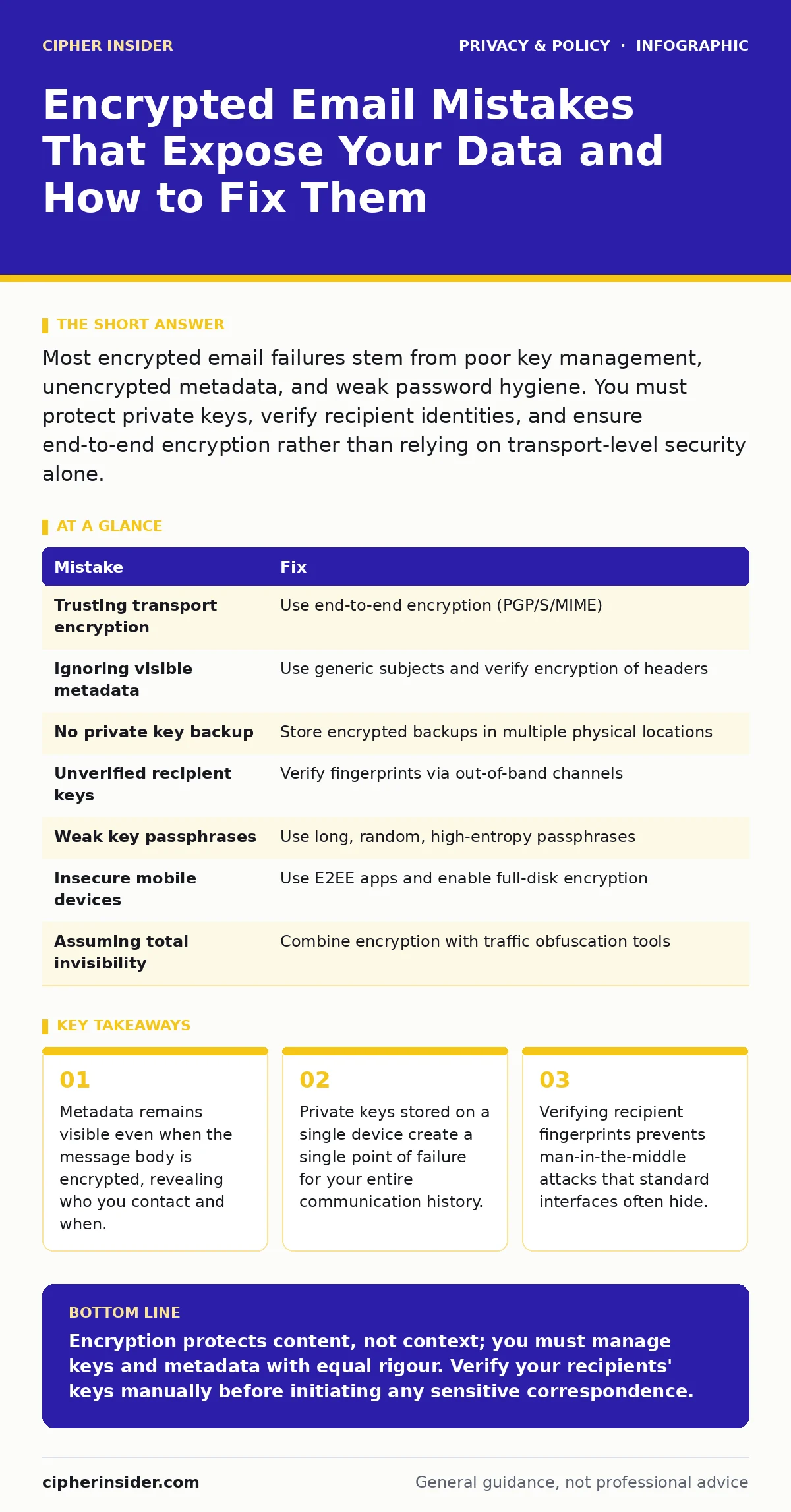
| Mistake | Fix |
|---|---|
| Trusting transport encryption | Use end-to-end encryption (PGP/S/MIME) |
| Ignoring visible metadata | Use generic subjects and verify encryption of headers |
| No private key backup | Store encrypted backups in multiple physical locations |
| Unverified recipient keys | Verify fingerprints via out-of-band channels |
| Weak key passphrases | Use long, random, high-entropy passphrases |
| Insecure mobile devices | Use E2EE apps and enable full-disk encryption |
| Assuming total invisibility | Combine encryption with traffic obfuscation tools |
Key takeaways
- Metadata remains visible even when the message body is encrypted, revealing who you contact and when.
- Private keys stored on a single device create a single point of failure for your entire communication history.
- Verifying recipient fingerprints prevents man-in-the-middle attacks that standard interfaces often hide.
Encryption protects content, not context; you must manage keys and metadata with equal rigour. Verify your recipients' keys manually before initiating any sensitive correspondence.
Frequently asked questions
Can I encrypt emails using standard webmail interfaces?
Most standard webmail providers do not support end-to-end encryption by default. You may need to use a dedicated client or a provider that explicitly offers PGP or S/MIME support.
What happens if I forget my passphrase?
You cannot recover your passphrase. If you lose it and have no backup, you will permanently lose access to messages encrypted with that key pair.
Is S/MIME better than PGP?
S/MIME is easier to manage in corporate environments with centralised certificate authorities, while PGP is more flexible for personal use and does not require a central authority. Choose based on your ecosystem.
Does encryption protect me from keyloggers?
No. If malware records your keystrokes, it can capture your passphrase or the content of your messages before they are encrypted. You must secure your device against malware separately.
How this guide was produced: written by the Cipher Insider editorial team with AI assistance, checked against the public references listed below, and reviewed when the facts change. See our editorial policy or report an error.