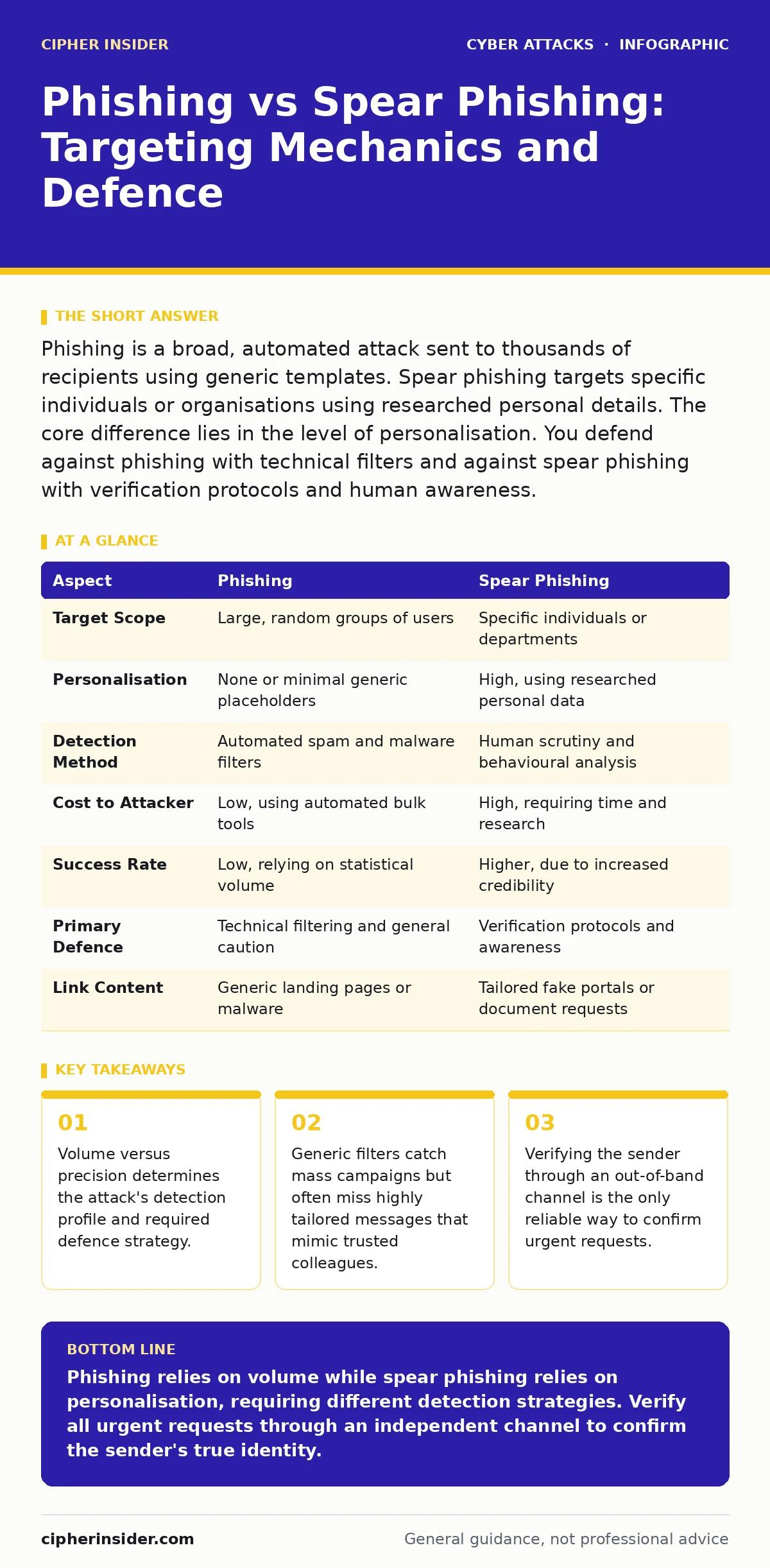
Phishing is a broad, automated attack sent to thousands of recipients using generic templates. Spear phishing targets specific individuals or organisations using researched personal details. The core difference lies in the level of personalisation. You defend against phishing with technical filters and against spear phishing with verification protocols and human awareness.
The Core Difference Between Phishing and Spear Phishing
Phishing relies on volume and generic deception, casting a wide net to catch anyone who clicks. Spear phishing relies on precision and personalisation, crafting a unique message for a single target based on prior research. The fundamental distinction is not the method of delivery, which is usually email, but the depth of the adversary's knowledge about you. Mass campaigns use hope that someone will act impulsively. Targeted attacks use hope that you will trust a familiar name or context. Understanding this shift from quantity to quality changes how you evaluate incoming communications.
What Is Generic Phishing
Generic phishing involves sending identical or nearly identical messages to a large, random list of addresses. The content is often urgent but vague, claiming issues with a bank account, a shipping delivery, or a software licence. Because the message contains little specific information about the recipient, it often triggers spam filters or raises immediate suspicion among cautious users.
These attacks depend on human error under pressure. The message creates a sense of urgency to bypass rational thinking. You receive a notice about an "unusual login attempt" or a "failed payment". The goal is to make you click a link before you consider the source. Defence against this relies heavily on automated scanning and general caution.
What Is Spear Phishing
Spear phishing is a targeted attack directed at a specific individual or organisation. The attacker researches their target using public information from social media, company websites, or previous breaches. They craft a message that references real colleagues, specific projects, or recent events. This personalisation makes the message appear legitimate, often bypassing automated security filters that look for known malicious patterns. The attacker may spoof the email address of a trusted manager or colleague to gain immediate credibility.
The success of spear phishing depends on the attacker's understanding of your workflow. If they know you are expecting an invoice or a document, they can create a convincing replica. The message might ask for a password change or request sensitive data transfer. Because the context is accurate, technical defences often fail to flag the message as malicious. You must rely on human verification to detect the subtle inconsistencies in tone or formatting.
Comparison: Phishing vs Spear Phishing
| Aspect | Phishing | Spear Phishing |
|---|---|---|
| Target Scope | Large, random groups of users | Specific individuals or departments |
| Personalisation | None or minimal generic placeholders | High, using researched personal data |
| Detection Method | Automated spam and malware filters | Human scrutiny and behavioural analysis |
| Cost to Attacker | Low, using automated bulk tools | High, requiring time and research |
| Success Rate | Low, relying on statistical volume | Higher, due to increased credibility |
| Primary Defence | Technical filtering and general caution | Verification protocols and awareness |
| Link Content | Generic landing pages or malware | Tailored fake portals or document requests |
Choosing the Right Defence Strategy
You must adapt your security posture based on the threat model. Generic defences protect the majority of traffic, while targeted defences protect high-value accounts. Understanding when to apply each layer prevents resource waste and ensures critical assets remain secure.
Choose generic phishing defences when:
- Monitoring large user bases with limited individual risk profiles.
- Implementing automated email filtering and domain authentication.
- Conducting broad security awareness training for all staff.
- Addressing high-volume spam and malware distribution campaigns.
Choose spear phishing defences when:
- Protecting executives, finance teams, or system administrators.
- Enforcing strict verification for financial transfers or data access.
- Monitoring accounts with high-value information or privileged access.
- Investigating messages that reference internal projects or private data.
These strategies overlap in the area of security awareness training. All users need basic literacy, but high-risk individuals require advanced simulation and incident response drills. Combining technical controls with human verification creates a layered defence. This approach mitigates the risk of session hijacking if credentials are compromised, as the attacker lacks the context to maintain access.
Overlapping Risks and Advanced Threats
The boundary between phishing and spear phishing blurs with watering hole attacks, where attackers compromise legitimate sites visited by a specific group. This combines the targeting of spear phishing with the passive delivery of phishing. Similarly, USB drop attacks rely on physical proximity and curiosity, mirroring the psychological manipulation of digital phishing. Understanding these variants helps you anticipate where traditional email filters fail.
Attackers may also use DNS spoofing to redirect legitimate-looking domains to malicious servers. This technical layer supports the social engineering narrative. If you verify the URL but the DNS record has been poisoned, you still connect to the attacker. Therefore, defence requires both human scepticism and technical integrity checks. Network segmentation limits the damage if a spear phishing attack succeeds, preventing lateral movement across the organisation.
Practical Verification Steps
When you receive a suspicious message, follow a strict verification protocol. Do not reply to the email, as this confirms the address is active. Instead, use a known, trusted contact method. Call the sender using a number from your directory, not one provided in the message. Check for subtle inconsistencies in the email header, such as mismatched display names and actual addresses.
For high-value transactions, establish a pre-agreed code word or secondary approval process. This adds a friction point that attackers cannot easily replicate. Regularly review access logs for unusual activity, which may indicate a successful compromise. By treating every urgent request as potentially malicious, you reduce the window of opportunity for attackers.
Key takeaways
- Volume versus precision determines the attack's detection profile and required defence strategy.
- Generic filters catch mass campaigns but often miss highly tailored messages that mimic trusted colleagues.
- Verifying the sender through an out-of-band channel is the only reliable way to confirm urgent requests.
Phishing relies on volume while spear phishing relies on personalisation, requiring different detection strategies. Verify all urgent requests through an independent channel to confirm the sender's true identity.
Frequently asked questions
How do I tell if an email address is spoofed?
Look at the full email address, not just the display name. Check for slight misspellings in the domain or unexpected characters. Mismatched headers often indicate spoofing.
Can antivirus software stop spear phishing?
Antivirus detects known malware but often misses customised spear phishing messages that contain no malicious code initially. Human verification and email filtering are more effective.
What is whaling in cybersecurity?
Whaling is a specific type of spear phishing targeting high-level executives. It uses extensive research to craft highly convincing messages for senior decision-makers.
Should I report suspicious emails even if I am sure they are fake?
Yes, reporting helps your security team identify patterns and block future attempts. It also provides data to improve automated filtering systems across the organisation.
How this guide was produced: written by the Cipher Insider editorial team with AI assistance, checked against the public references listed below, and reviewed when the facts change. See our editorial policy or report an error.